
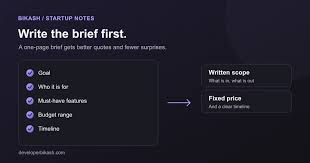
Two development teams can quote very different prices for the same app idea. One may assume you need an Android prototype, while the other budgets for an Android and iOS launch, a backend, and an admin dashboard. Both proposals can make sense given the information each team received. The trouble starts when you try to compare them or discover halfway through development that a feature you considered essential was never included in the estimate.
A project brief gives every team the same starting point. It explains who will use the app, what they should be able to do, and which requirements could affect the cost or delivery schedule. If you’re comparing mobile app development services in India, share the same brief with every shortlisted company and ask each one to state its assumptions. You can write the brief in plain language and leave technical choices open. The seven sections below cover the decisions a development partner needs to price the work and identify what still needs discussion before you commit.
1. Define the Business Goal and Target Users
Start with the problem the app should solve and the people who experience it. A clinic might want patients to reschedule appointments without calling reception. A distributor might want retailers to reorder stock without sending spreadsheets. A specific goal helps the development team identify which features matter at launch and suggest a simpler way to achieve the same result.
Describe the primary user journey
Write down what a typical user does from opening the app to completing their main task. Include what happens when they encounter a common obstacle, such as an unavailable appointment.
- Name your primary users and where they’ll use the app.
- Describe how those users complete the same task today.
- Choose a measurable outcome, such as fewer calls to reschedule appointments.
- Note language or accessibility needs that could affect the design.
2. Separate Launch Features From Later Additions
List the features users need to complete the main task on launch day. For a booking app, that might include viewing availability, confirming a slot, and receiving a reminder. Loyalty rewards and referral discounts can go into a later release. This distinction gives developers a smaller scope to estimate and helps you see which features are driving the total.
Explain what each feature must do
Describe features in terms of user actions and business rules. For example, explain whether a customer can cancel any booking, whether a deadline applies, and how the app handles refunds.
- Divide features into launch requirements and later additions.
- List what customers, staff, and administrators can each do.
- Specify who approves exceptions, refunds, or account changes.
- Include any manual steps your team can handle during the first release.
3. Specify Platforms, Devices, and Design Assets
Tell the vendor whether you need Android, iOS, or both, and whether staff need a web dashboard. Mention devices or environments that affect how the app works, such as older phones, shared tablets, or locations with unreliable internet. Include any existing designs, brand guidelines, or app screens so the team can estimate what it can reuse and what requires new work.
Attach designs and explain their status
Share screenshots, wireframes, or a Figma link if available. Identify which screens are approved, which are examples, and where you expect the development partner to design the experience from scratch.
- List the platforms required for the first release.
- Flag any offline tasks, such as collecting field data.
- Share brand files and note who will approve designs.
- For a game app, tell a studio such as SM Gaming Services whether gameplay, artwork, and multiplayer are in scope.
4. Document Integrations and Data Requirements
Name the systems the app must connect to, such as a payment gateway, CRM, inventory platform, or messaging provider. Explain what information should move between them and when. A simple order confirmation has a different scope from keeping inventory synchronized across several stores. Also mention existing records you want migrated and any requirements for data access, storage, retention, or deletion.
Show how information should move
Use one example for each integration. For an inventory system, describe when stock changes appear in the app, how cancellations update quantities, and what staff should see if synchronization fails.
- Name existing providers and identify who manages those accounts.
- Share available API documentation or test environment details.
- Estimate the volume of records to migrate and identify known data issues.
- Ask vendors to itemize third-party fees and ongoing infrastructure costs.
5. State the Budget, Timeline, and Dependencies
Share a budget range if one has been approved, and explain whether it covers design, development, testing, launch, and post-launch support. Give the team a target launch date and say what makes it important. A fixed event date may require a smaller first release. Mention dependencies such as internal approvals, access to existing systems, or content your team needs to supply.
Distinguish fixed dates from flexible milestones.
Identify the deadline that matters most and what must be usable by then. For example, an internal demo may only need sample data, while a pilot may require live integrations.
- Give the target launch date and explain what drives it.
- Name the person who can approve scope and design decisions.
- List materials, approvals, and access your team will provide.
- Ask the vendor to identify dependencies that could affect the schedule.
6. Set Expectations for Testing, Launch, and Ownership
Describe what you expect the vendor to test and who will confirm that the app is ready to launch. Clarify who handles app store submission, production setup, and staff training. Put handover requirements in the brief early, especially ownership of source code, design files, and service accounts. These decisions affect the quote and how easily another team can maintain the app.
Define what counts as ready
Choose acceptance criteria for the main user journeys. For instance, an appointment is complete when it appears in the staff calendar and the customer receives confirmation with the correct details.
- List the devices and workflows that must pass testing.
- Agree who signs off on the release.
- Specify which files, accounts, and documentation you expect at handover.
- Ask how the vendor handles defects discovered after launch.
7. Request a Quote You Can Compare
End the brief by telling vendors how to structure their proposals. Ask for costs by phase, estimated milestones, and a clear account of what each price covers. Request a separate price for optional work and recurring fees. If a requirement is unclear, ask the vendor to explain how it interpreted that requirement and what could change the estimate once confirmed.
Ask vendors to document assumptions.
Have each vendor state what the estimate depends on. If the team assumes your staff will prepare the content or supply finished designs, that responsibility should appear in the proposal.
- Request a breakdown for design, development, testing, and launch.
- Ask how scope changes are priced and approved.
- Get separate estimates for maintenance, hosting, and optional features.
- Compare what each quote delivers by launch day before comparing totals.
Final Thoughts
A clear project brief makes it easier to compare mobile app development quotes and spot gaps before work begins. Start with the problem your app solves, the users it serves, and the features they need on launch day. Then document the platforms, integrations, deadlines, and handover expectations that could affect the estimate. Send the same brief to every shortlisted team and ask each vendor to spell out its assumptions and ongoing costs. Before you commit, confirm exactly what your team will receive at launch and who will support the app afterward.
